
Crystal Movie Vue
A modern, feature-rich movie application
About the Project
⚓︎Introduction
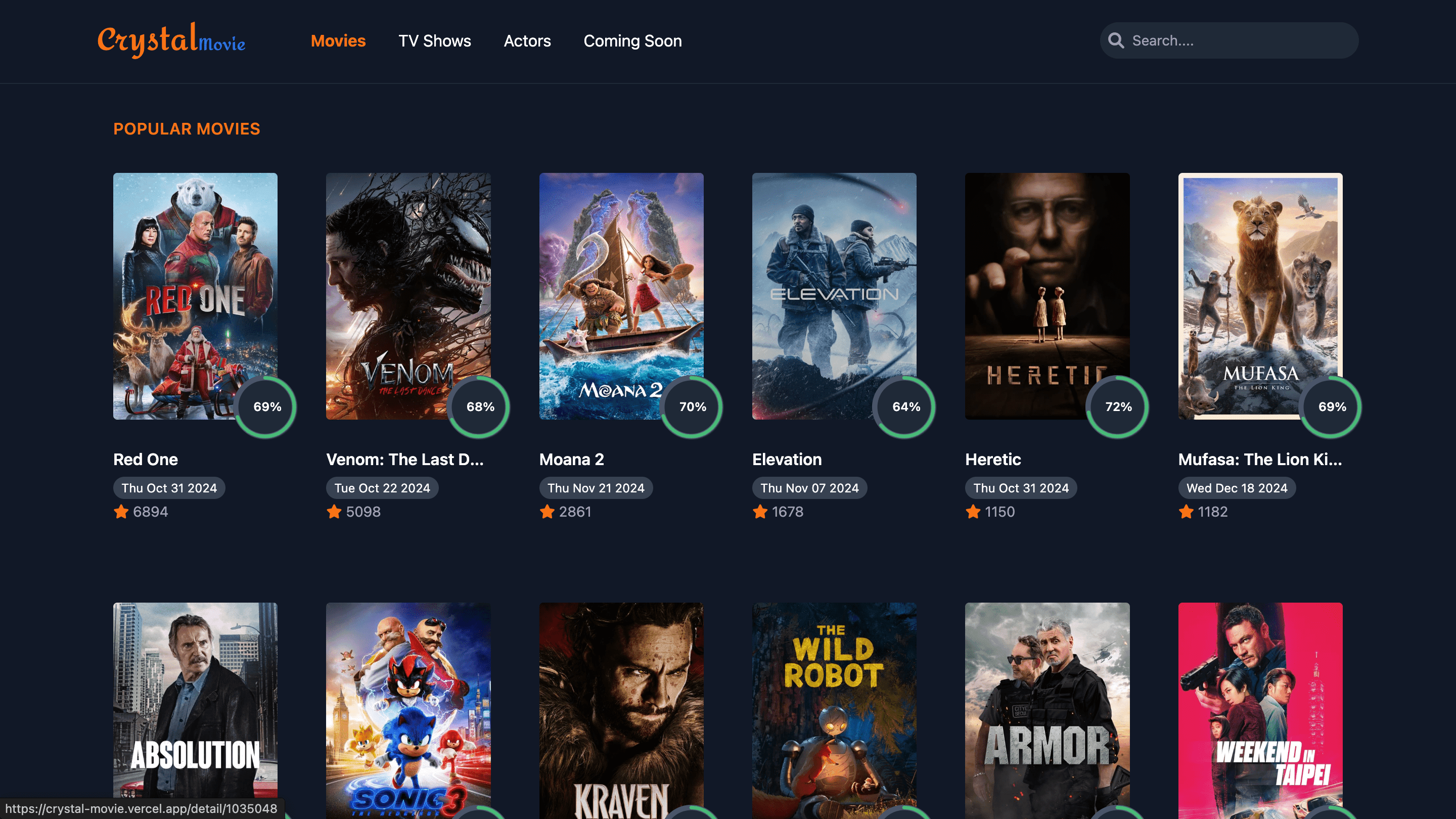
Crystal Movie serves as a sleek and interactive movie browsing platform, where users can search for movies, view detailed information, watch trailers, and explore cast details. By leveraging the TMDB API for movie data and Vue.js for building the front end, the app delivers a smooth and responsive experience. The use of Tailwind CSS allows for efficient styling with a focus on utility-first design principles. The app provides a modern interface with features like a movie search bar, trending movies, detailed movie information, and responsive design to ensure an excellent user experience across devices.
React Version is here.⚓︎Technical Implementation
Core Technologies
- Frontend: Vue.js for creating dynamic and responsive user interfaces.
- Styling: Tailwind CSS for utility-first CSS design.
- API: The TMDB API for fetching data about movies, TV shows, and actors.
Key Components
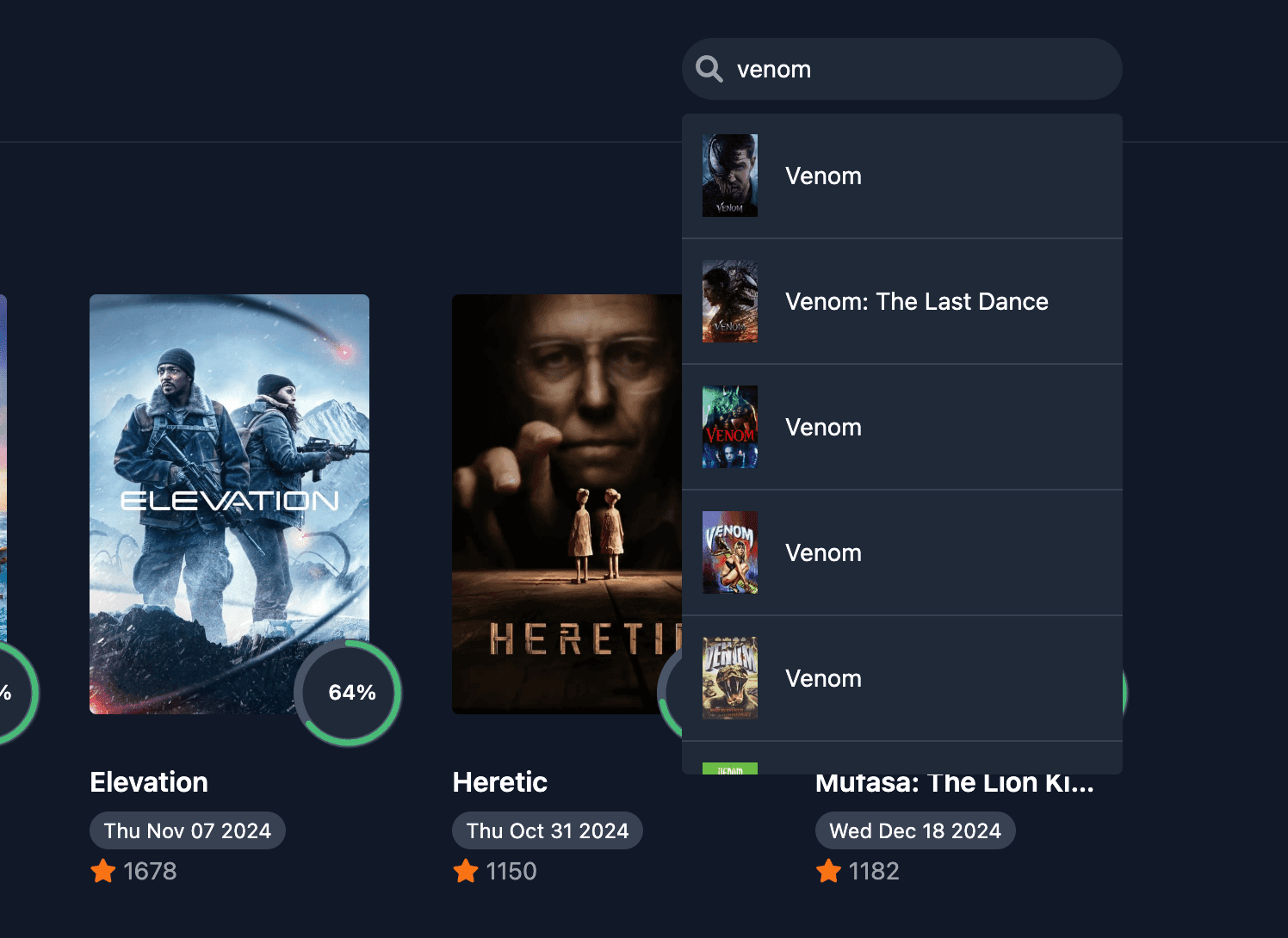
- MovieSearch: A search bar component allowing users to search for movies, TV shows, and actors in real time.
- MovieCard: Reusable component displaying movie details such as title, release date, ratings, and image.
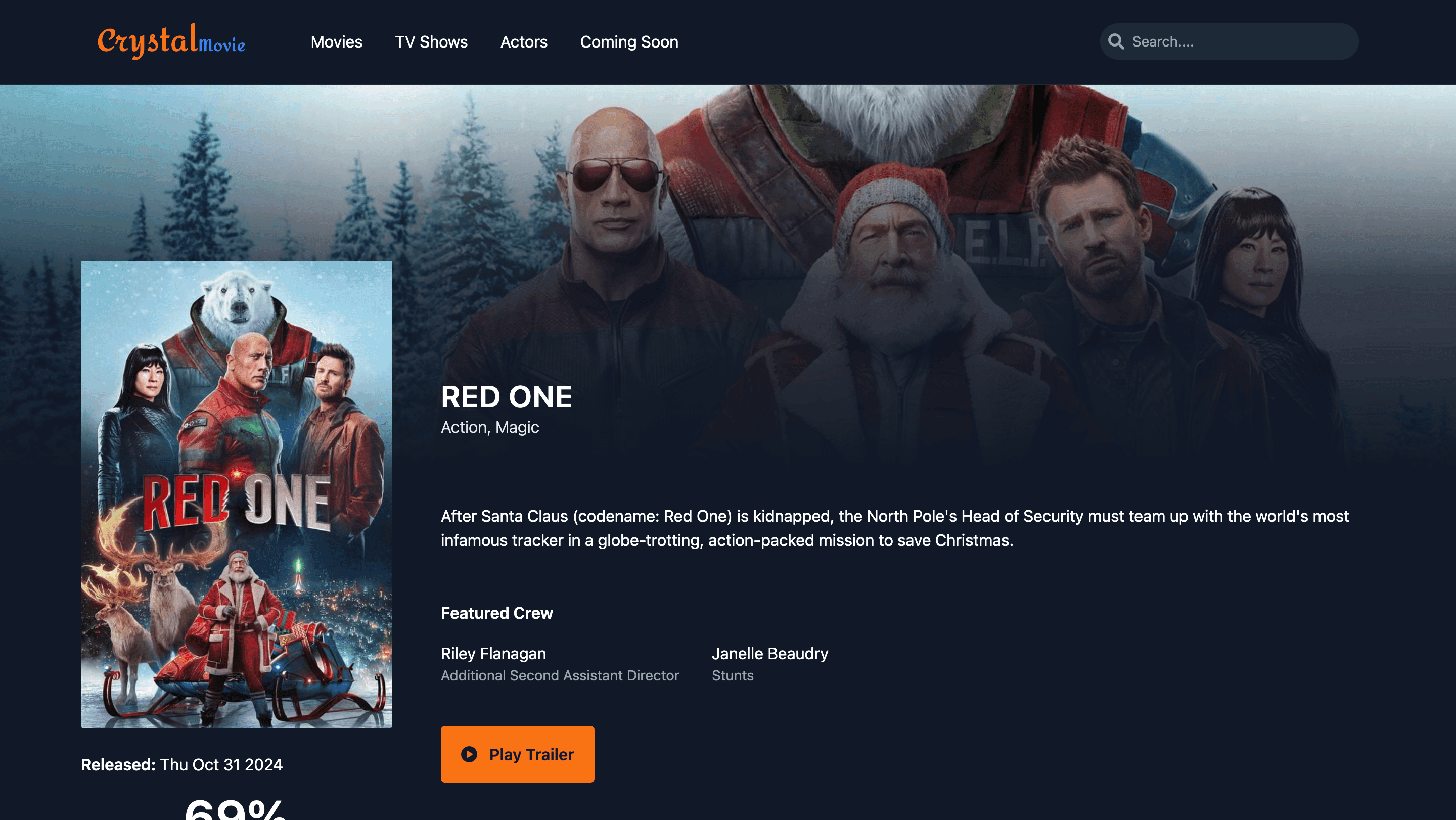
- MovieDetails: A detailed page for each movie showing additional information such as the cast, trailers, and plot summaries.
- TrendingMovies: A component that displays the currently trending movies, fetched from the TMDB API.
- ActorProfile: A component displaying the details of an actor including biography, filmography, and image gallery.
⚓︎Features
1. Movie Search
- Real-time search bar with autocomplete functionality.
- Search results are filtered by movie, TV show, or actor.
- Option to filter results by popular, top-rated, or upcoming content.
2. Movie Listings
- Display popular, now-playing, upcoming, and top-rated movies.
- Pagination or infinite scroll for loading more movies.
- Each movie card includes basic information like title, poster, release date, and rating.
3. Movie Details
- Access detailed information for each movie including:
- Plot summary
- Cast and crew
- Trailers and video clips
- Image galleries
- Ratings and release dates
4. Actor/People Profiles
- View actor profiles with personal information, photo galleries, and filmography.
- See which movies and TV shows they are known for.
5. Responsive Design
- Fully responsive, ensuring smooth browsing experience across devices.
- Tailwind CSS provides responsive utilities for different screen sizes.
API Integration
- TMDB API: Used to fetch movie data. The app integrates the TMDB API to retrieve movie details, actor information, and more.
- API calls are made asynchronously using Axios to fetch data and display it in the UI dynamically.
⚓︎Code Reference
Fetching popularMovies and nowPlayingMovies from the API
<script>
import axios from "axios";

export default {
  name: "HomeView",
  data() {
    return {
      popularMovies: [],
      nowPlayingMovies: [],
      isDone: false,
    };
  },
  created() {
    const token = "YOUR_API_KEY";

    // Call reusable function for fetching data
    this.fetchMovies("popular", token, "popularMovies");
    this.fetchMovies("now_playing", token, "nowPlayingMovies");

    // Simulate loading completion
    setTimeout(() => {
      this.isDone = true;
    }, 2000);
  },
  methods: {
    async fetchMovies(endpoint, token, stateProperty) {
      try {
        const response = await axios.get(
          `https://api.themoviedb.org/3/movie/${endpoint}`,
          {
            headers: { Authorization: `Bearer ${token}` },
          },
        );
        this[stateProperty] = response.data.results;
      } catch (error) {
        console.error(`Failed to fetch ${endpoint} movies:`, error);
      }
    },
  },
};
</script>
Fetching popularTvShows and topRatedTvShows from the API
<script>
import axios from "axios";

export default {
  name: "TVshowsView",
  data() {
    return {
      popularTv: [],
      topRatedTv: [],
      isDone: false,
    };
  },
  created() {
    const token = "YOUR_API_KEY";

    // Call reusable function for fetching data
    this.fetchData("popular", token, "popularTv");
    this.fetchData("top_rated", token, "topRatedTv");

    // Simulate loading completion
    setTimeout(() => {
      this.isDone = true;
    }, 2000);
  },
  methods: {
    async fetchData(endpoint, token, stateProperty) {
      try {
        const response = await axios.get(
          `https://api.themoviedb.org/3/tv/${endpoint}`,
          {
            headers: { Authorization: `Bearer ${token}` },
          },
        );
        this[stateProperty] = response.data.results;
      } catch (error) {
        console.error(`Failed to fetch data for ${endpoint}:`, error);
      }
    },
  },
};
</script>
Creating Utility Functions for Fetching Data and Environment Variables
Environment Configuration
The application uses an environment variable VITE_TMDB_TOKEN to store the TMDB API token securely.
VITE_TMDB_TOKEN=your_api_token_here
Utility Function for Data Fetching
A reusable fetchData utility function simplifies API calls to fetch popular movies, now-playing movies, TV shows, and other resources. This function manages API token authorization and handles errors gracefully, returning only the relevant data.
import axios from "axios";

export const fetchData = async (endpoint) => {
  const token = import.meta.env.VITE_TMDB_TOKEN; // Read token from environment variable
  try {
    const response = await axios.get(
      `https://api.themoviedb.org/3/${endpoint}`,
      {
        headers: {
          Authorization: `Bearer ${token}`,
        },
      },
    );
    return response.data.results; // Return only the results
  } catch (error) {
    console.error(`Failed to fetch data for ${endpoint}:`, error);
    return []; // Return an empty array on failure
  }
};
Fetching and Displaying Data in Views
Using in HomeView
The HomeView component demonstrates fetching popular movies and now-playing movies using the fetchData function. It incorporates loading state management to ensure smooth user experience during data retrieval.
<script>
import { fetchData } from "@/utils/api";
export default {
  async created() {
    try {
      // Set loading state
      this.isDone = false;

      // Fetch TV data
      this.popularMovies = await fetchData("movie/popular");
      this.nowPlayingMovies = await fetchData("movie/now_playing");
    } catch (error) {
      console.error("Error fetching TV shows:", error);
    } finally {
      // Mark loading as done
      this.isDone = true;
    }
  },
};
</script>
Using in TvShowsView
The TvShowsView component retrieves popular and top-rated TV shows using the same utility function. Like HomeView, it maintains a consistent loading experience.
<script>
import { fetchData } from "@/utils/api";
export default {
  async created() {
    try {
      // Set loading state
      this.isDone = false;

      // Fetch TV data
      this.popularTv = await fetchData("tv/popular");
      this.topRatedTv = await fetchData("tv/top_rated");
    } catch (error) {
      console.error("Error fetching TV shows:", error);
    } finally {
      // Mark loading as done
      this.isDone = true;
    }
  },
};
</script>⚓︎Fetching Movie or TV Show Details - credits, videos, images
Two Approaches for Fetching Details
1. Separate API Calls for Each Data Type
Functions:
- fetchMovieDetail retrieves the primary details of a movie using its ID.
- fetchMovieDetailInfo fetches additional data like credits, videos, or images by specifying the type.
import axios from "axios";

export const fetchMovieDetail = async (id) => {
  const token = import.meta.env.VITE_TMDB_TOKEN; // Read token from environment variable
  try {
    const response = await axios.get(
      `https://api.themoviedb.org/3/movie/${id}`,
      {
        headers: {
          Authorization: `Bearer ${token}`,
        },
      },
    );
    return response.data; // Return the API response
  } catch (error) {
    console.error(`Failed to fetch movie with ID ${id}:`, error);
    return null; // Return null on failure
  }
};

export const fetchMovieDetailInfo = async (id, type) => {
  const token = import.meta.env.VITE_TMDB_TOKEN; // Read token from environment variable
  try {
    const response = await axios.get(
      `https://api.themoviedb.org/3/movie/${id}/${type}`,
      {
        headers: {
          Authorization: `Bearer ${token}`,
        },
      },
    );
    return response.data; // Return the API response
  } catch (error) {
    console.error(`Failed to fetch ${type} for movie with ID ${id}:`, error);
    return null; // Return null on failure
  }
};
Usage
This approach allows granular control over which details to fetch, improving flexibility.
<script>
import { fetchMovieDetail, fetchMovieDetailInfo } from "@/utils/api";
export default {
  name: "MovieDetailsView",
  data() {
    return {
      detailData: {},
      casts: [],
      crews: [],
      videos: [],
      images: {},
      isDone: false,
      id: this.$route.params.id, // Assuming movie ID comes from route params
    };
  },
  async created() {
    try {
      this.isDone = false;

      // Fetch movie details
      const detailData = await fetchMovieDetail(this.id); // movie detail
      const credits = await fetchMovieDetailInfo(this.id, "credits"); // movie credits
      const videos = await fetchMovieDetailInfo(this.id, "videos"); // movie videos
      const images = await fetchMovieDetailInfo(this.id, "images"); // movie images

      // Assign data to component
      if (detailData) {
        this.detailData = detailData;
      }
      if (credits) {
        this.casts = credits.cast || [];
        this.crews = credits.crew || [];
      }
      if (videos) {
        this.videos = videos.results || [];
      }
      if (images) {
        this.images = images || {};
      }
    } catch (error) {
      console.error("Error loading movie data:", error);
    } finally {
      this.isDone = true; // Loading state completed
    }
  },
};
</script>
2. Combined API Call with append_to_response
Function:
fetchTvDetails uses the append_to_response parameter to fetch all required data (credits, videos, images) in a single API call.
import axios from "axios";

export const fetchTvDetails = async (id) => {
  const token = import.meta.env.VITE_TMDB_TOKEN; // Secure token from .env
  try {
    const url = `https://api.themoviedb.org/3/tv/${id}?append_to_response=credits,videos,images`;
    const response = await axios.get(url, {
      headers: {
        Authorization: `Bearer ${token}`,
      },
    });
    return response.data; // Return API response
  } catch (error) {
    console.error(`Error fetching TV details for ID ${id}:`, error);
    return null; // Return null on failure
  }
};
Usage:
This approach reduces the number of API calls, offering better performance for fetching complete TV show details.
<script>
import { fetchTvDetails } from "@/utils/api";
export default {
  name: "TvDetailsView",
  data() {
    return {
      detailData: {},
      videos: [],
      images: {},
      casts: [],
      crews: [],
      seasons: 0,
      episodes: 0,
      isDone: false,
      id: this.$route.params.id, // Assuming TV show ID comes from route params
    };
  },
  async created() {
    try {
      this.isDone = false;

      // Fetch TV details
      const data = await fetchTvDetails(this.id);

      // Assign data to component properties
      if (data) {
        this.detailData = data;
        this.videos = data.videos?.results || [];
        this.images = data.images || {};
        this.casts = data.credits?.cast || [];
        this.crews = data.credits?.crew || [];
        this.seasons = data.number_of_seasons || 0;
        this.episodes = data.number_of_episodes || 0;
      }
    } catch (error) {
      console.error("Error loading TV details:", error);
    } finally {
      this.isDone = true; // Loading completed
    }
  },
};
</script>⚓︎Conclusion
Crystal Movie is a feature-rich movie browsing app that offers users an immersive experience to discover and explore movies, TV shows, and actors. Built with Vue.js, Tailwind CSS, and powered by the TMDB API, the project demonstrates how modern technologies can work together to create a dynamic and responsive user interface. Whether you're a movie enthusiast or just looking for your next film to watch, Crystal Movie makes it easy to search for, discover, and learn more about movies in a visually appealing and user-friendly environment. This app highlights the power of Vue.js and API integration to build a modern, efficient web application.
Happy Coding! 🎉